Concepts
Documents exalsius-operator v0.12.1
This page is imported from docs/concepts.md at commit
89ec764, which updates the documentation of release v0.12.1. To change it, open a pull request there.
This page explains how the exalsius-operator's three resources turn into clusters and running workspaces, and where each piece runs. It is background for the quick start and the Helm chart; neither requires reading it first.
The three resources
The operator adds three Custom Resource Definitions to a Kubernetes cluster:
- Colony (
infra.exalsius.ai/v1, namespaced) lists the clusters you want provisioned, possibly across several cloud providers or on-premise sites. Each entry names a cluster template and a credential. - WorkspaceClass (
workspaces.exalsius.ai/v1, cluster-scoped) is a catalog entry for a type of workspace: a Jupyter notebook, an inference server, a training stack. Platform administrators publish classes; users pick from them. The analogy is aStorageClass: the class describes what is available, not a running instance. - WorkspaceDeployment (
workspaces.exalsius.ai/v1, namespaced) is a user's request for one instance of a class on one specific cluster. The operator publishes the instance's phase, conditions and access URLs on its status, so a client only ever watches this one resource.
The operator does not provision machines or install Helm charts itself. It translates these resources into k0rdent objects and watches k0rdent's status flow back:
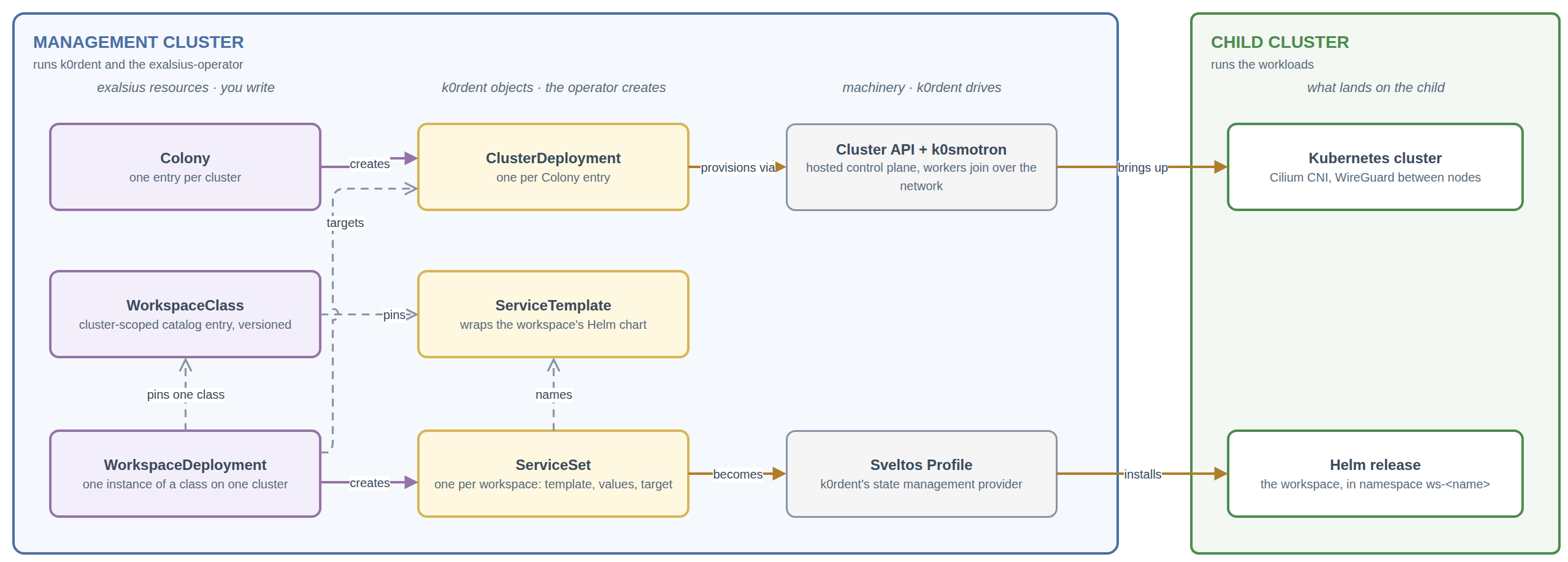
Where things run
exalsius distinguishes three kinds of cluster:
- The management cluster runs k0rdent and the operator. All three resources, and every k0rdent object the operator creates from them, live here. So do the Secrets holding each child's kubeconfig, which is how the operator and k0rdent reach into the clusters they manage.
- A child cluster runs workloads. It is provisioned from a Colony entry
and represented by a k0rdent
ClusterDeployment. The only thing a workspace puts on a child is its Helm release, in a namespace namedws-<workspace name>. That namespace is the unit of isolation and cleanup for the workspace. - A regional cluster is the per-tenant hub. It hosts the shared tenant infrastructure: the Gateway that terminates TLS for the tenant's domain, the hosted control planes of the tenant's child clusters, and observability. Every child cluster belongs to exactly one regional cluster.
A tenant is an organization using the platform. Tenant, regional cluster
and tenant domain are one-to-one, so a workspace hostname such as
my-notebook.<tenant-domain> identifies both the workspace and where its
traffic enters.
The quick start collapses this to two machines: the
management node also hosts the child's control plane, there is no regional
cluster, and the notebook is reached with kubectl port-forward instead of a
published URL. Everything else works the same way.
From a Colony to clusters
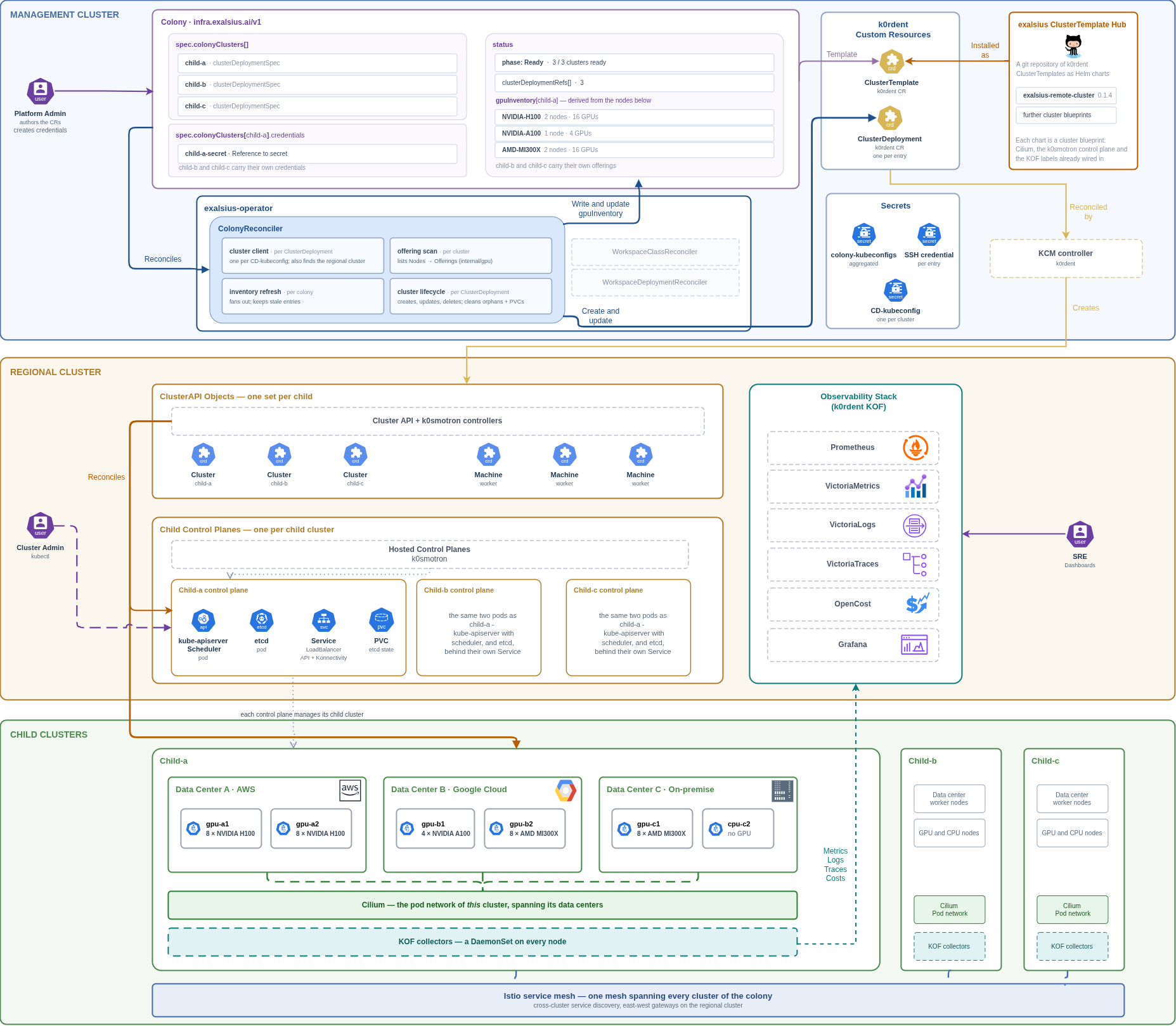
The ColonyReconciler creates one k0rdent ClusterDeployment per
colonyClusters[] entry, each pointing at a ClusterTemplate and a
Credential registered in k0rdent. The template is a Helm chart that
describes a cluster blueprint: which Cluster API provider, which Kubernetes
distribution, and, for exalsius templates, Cilium as the CNI already wired in.
k0rdent, Cluster API and k0smotron take it from there. With k0smotron the
child's control plane runs as pods on the hosting cluster and its worker
nodes join over the network, which is why the quick start can provision a
child cluster onto a bare SSH-reachable machine. Because the control plane is
hosted and Cilium encrypts node-to-node pod traffic with WireGuard, the
workers of one child cluster do not need to share a network; they can be
machines in different datacenters or clouds, as long as they reach the
control plane endpoint and each other on Cilium's ports.
Two things flow back onto the Colony. Its status reports the phase and how many of its clusters are ready. Its GPU inventory lists, per child cluster, which GPU offerings exist and how many of each, derived from the nodes' labels and extended resources. The inventory describes what exists; it does not track what is free, because free capacity changes by the second and is computed live when a workspace is admitted.
The operator also keeps an aggregated kubeconfig Secret per Colony, so tools that span a whole Colony have one file to read. Deleting a Colony deletes its ClusterDeployments, and k0rdent tears the clusters down.
From a WorkspaceClass and a WorkspaceDeployment to a running workspace
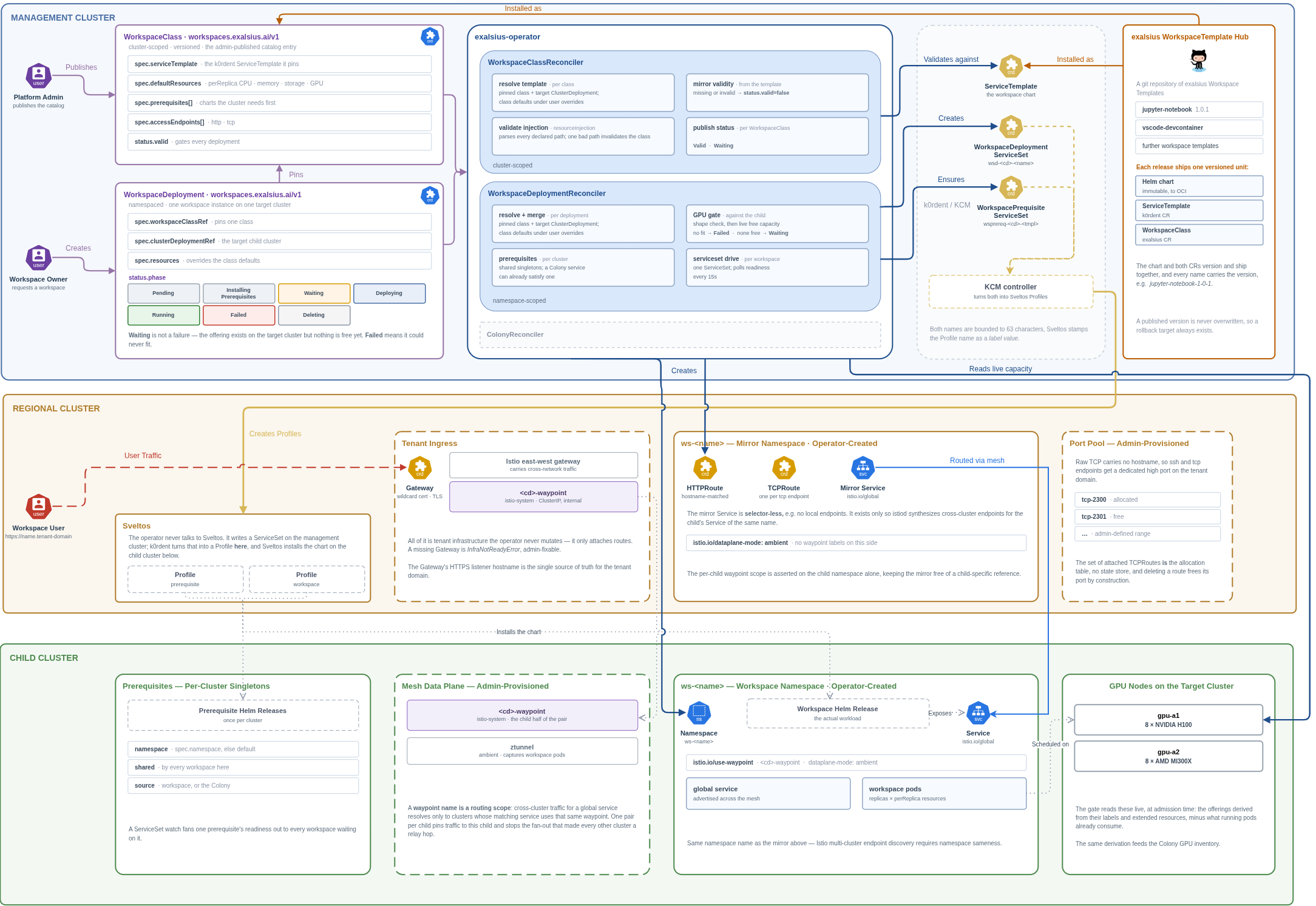
The class is a versioned, immutable catalog entry
A WorkspaceClass pins a k0rdent ServiceTemplate, which wraps the workspace's
Helm chart. Beyond the chart it declares the default resource shape (replicas,
and CPU, memory, storage and GPUs per replica), the prerequisites the
target cluster needs first, the access endpoints the workspace exposes,
the configuration prompts a user sees, and a deploy timeout.
Classes are versioned: the name carries the version
(jupyter-notebook-0-3-0), a WorkspaceDeployment pins one exactly, and a
published version is never changed. A running workspace's definition therefore
never changes underneath it, and rolling back means pointing at the previous
class. Chart, ServiceTemplate and WorkspaceClass for one version ship together
as a workspace template; the public catalog of these is the
exalsius-workspace-hub.
The deployment merges, gates and hands off
For each WorkspaceDeployment the WorkspaceDeploymentReconciler:
- Resolves and merges. It reads the pinned class and the target ClusterDeployment and merges the class defaults with the user's overrides for resources and Helm values.
- Ensures prerequisites. A prerequisite is cluster-local shared
infrastructure, such as a GPU operator or a Slurm operator, that must be
healthy before the workspace can run. It is declared on the class, never
on the deployment, and installed at most once per child cluster; every
workspace that needs it shares the one install. If the Colony already
installed the service, that counts. While the operator installs a missing
prerequisite the deployment reads
InstallingPrerequisites. - Gates on GPU capacity. If the deployment asks for GPUs, the operator
checks the target cluster live: does the requested offering exist, and are
enough GPUs free right now? An offering that does not exist is a terminal
Failed. An offering that exists but is fully used puts the deployment inWaiting, which is not an error: the operator holds the workspace and retries until capacity frees up. The same node selector the gate checks is the one the chart places on, so a request that passes the gate is always schedulable. - Creates one ServiceSet per workspace. The k0rdent
ServiceSetnames the ServiceTemplate, the merged values and the target ClusterDeployment. k0rdent turns it into a Sveltos Profile, and Sveltos installs the Helm release intows-<name>on the child. The operator polls readiness and moves the deployment toRunning. One ServiceSet per workspace means independent workspaces are deployed and tracked independently and never write to shared fields of the ClusterDeployment.
The phases in order: Pending, InstallingPrerequisites (only when the class
declares prerequisites), Waiting (only when GPUs are requested and none are
free), Deploying, Running; plus Failed for errors a person has to
resolve, and Deleting while the release is uninstalled. Deleting a
WorkspaceDeployment deletes its ServiceSet, and the namespace on the child
goes with it, including the workspace's volumes.
Workspace access
A workspace's chart exposes a plain ClusterIP Service; it does not create
Ingresses or NodePorts. Publishing that Service is the operator's job, and it
depends on what surrounds the child cluster:
- Without a regional cluster, as in the quick start, the Service is
reachable only from inside the child or through
kubectl port-forward. The deployment reportsRunning, itsURLstays empty, and its routing condition says the infrastructure is not ready. The workspace is fine. - With a regional cluster, the operator attaches routes for each declared
endpoint to the tenant's Gateway. The workspace's first HTTP endpoint is
published at
https://<workspace-name>.<tenant-domain>, further HTTP endpoints athttps://<workspace-name>-<endpoint-name>.<tenant-domain>, and non-HTTP endpoints such as SSH on a dedicated port of the tenant domain drawn from a per-tenant port pool. Traffic crosses from the regional cluster to the child over a service mesh that spans the tenant's clusters. The operator only attaches routes; the Gateway, the mesh and the port pool are tenant infrastructure that administrators provision.
The resulting URLs appear on the WorkspaceDeployment's status, which is the one place a client needs to look.